Claude Code just shipped Workflows. Here's what they actually are.
Opus 4.8 took center stage, but Workflows are the more useful drop. A 16-minute walkthrough, distilled: what they are, how they run, what they cost, and when to actually use one.
Watch on YouTubeA Workflow moves the orchestrator out of Claude's context and into a script.
- The shift — instead of Claude orchestrating sub-agents inside its own context, a
workflow.jsscript does it. State lives in variables, the loops are deterministic, and only the final answers come back to chat. - Sub-agents, scaled — the same isolated-context sub-agents you already had, now coordinated by code. 16 run concurrently, up to 1,000 total per run.
- They burn tokens — one vitamin C deep-research run used 3 million tokens across 105 agents. Not an everyday tool.
- Pick a model per phase — Haiku for high-volume generation, Sonnet for scoring, Opus for synthesis. Set on each
agent()call. - When to use one — reach for a Workflow when work fans out across many similar items, or when you want deterministic, resumable loops. Otherwise a skill or plain chat is fine.
01 · The drop
The more valuable announcement
Workflows shipped alongside Opus 4.8, and the speaker's take is that Workflows, not the model, are the most valuable part of the announcement. The whole thing rests on one prerequisite: the sub-agent. So that's where the video starts.
02 · The problem
Context fills up with bloat
A normal Claude Code session keeps accumulating — tool calls, MCP, long reasoning, long conversations — until the context window is full. Even with a 1M ceiling, most of what's in there is junk you don't need. Get rid of the bloat and the conversation in your main window works better, with no need for Claude to compact the session.
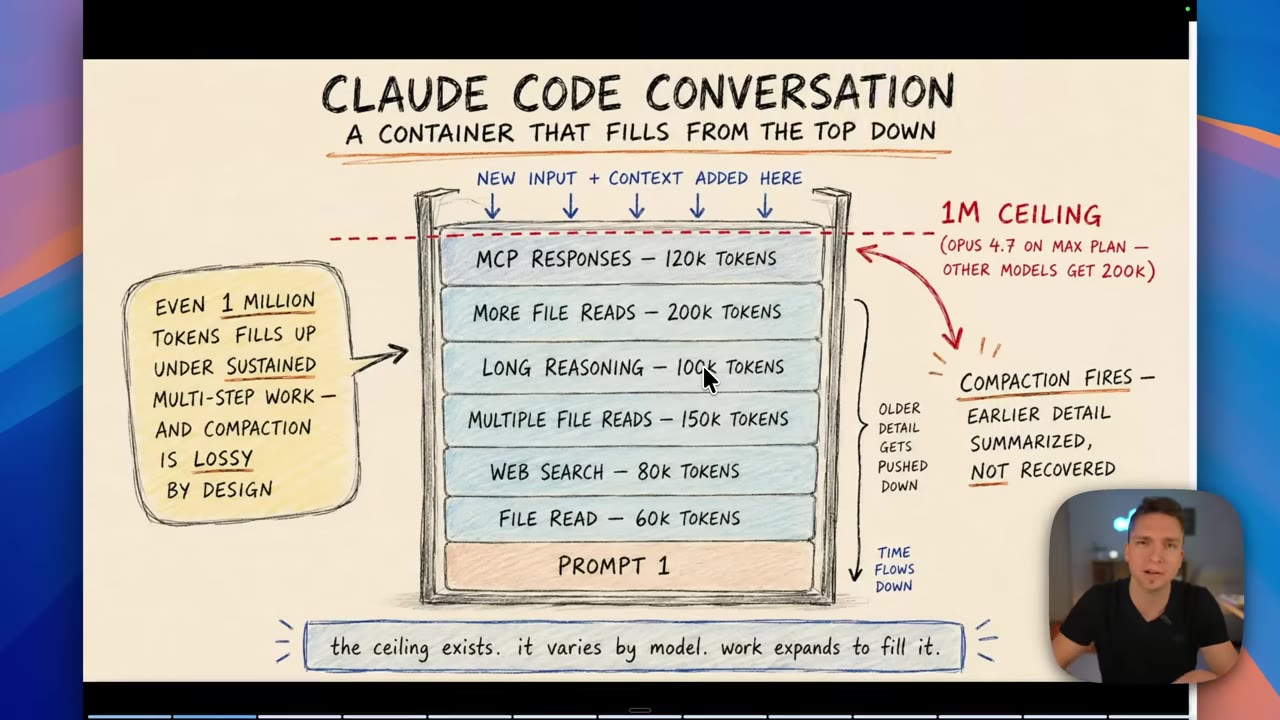
Sub-agents are the fix you already had: spawn a fresh Claude Code session with its own isolated context, give it one task, and return only the answer. A 60,000-token job runs in the sub-agent and pushes back the ~500 tokens you actually need — no bloat, no compaction.
03 · The shift
Move the manager into a script
Sub-agents alone don't cover everything. Right now Claude is the orchestrator: six sub-agents is fine and usually accurate, but at scale it has to hold intermediate state, decide who runs next and what they run, and manage all the results. The manager starts losing track. The fix is to move the manager over to a script.
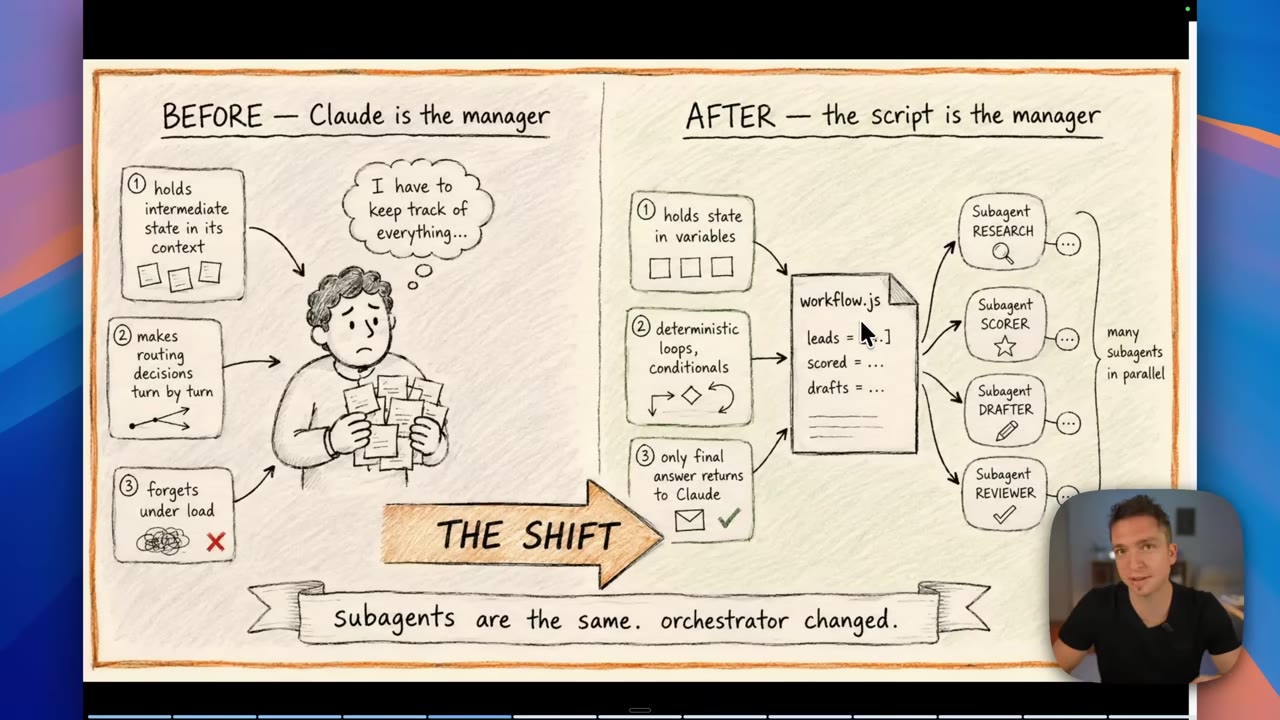
We no longer have this overburdened main context window. We have a workflow.js script that holds the state inside variables. It has deterministic loops, and only the final answers return to our main context.— Mansel Scheffel04 · Under the hood
Runtime, journal, and the limits
At runtime workflow.js runs as a separate process. It loads the JavaScript, executes what's inside it, and spawns the sub-agents to do the work. A journal sits in between and tracks the state, which is what lets you pause a run and resume it later.
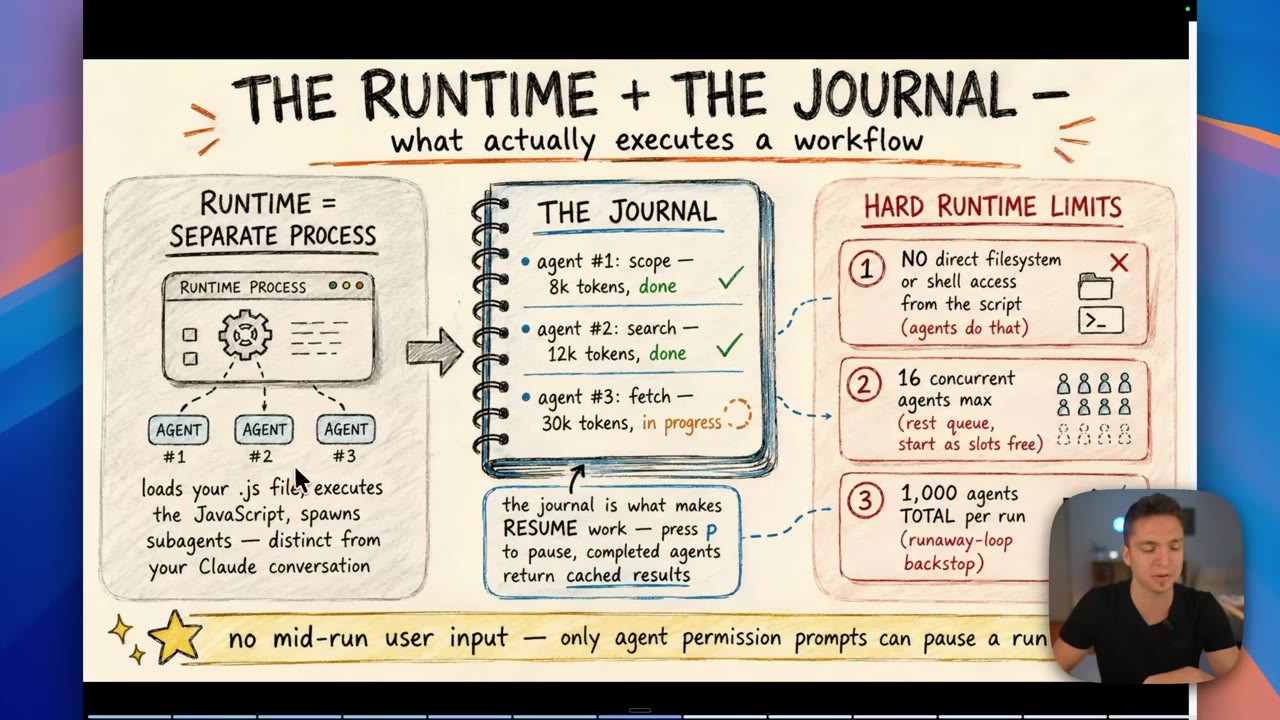
No FS or shell from the script
The script can't touch the filesystem or shell directly. The agents do that.
16 concurrent agents max
This is the main limit right now. The rest queue and start as slots free up.
1,000 agents total per run
A backstop on runaway loops. You can still run a massive swarm.
05 · Live demo
Deep research, and a 3-million-token bill
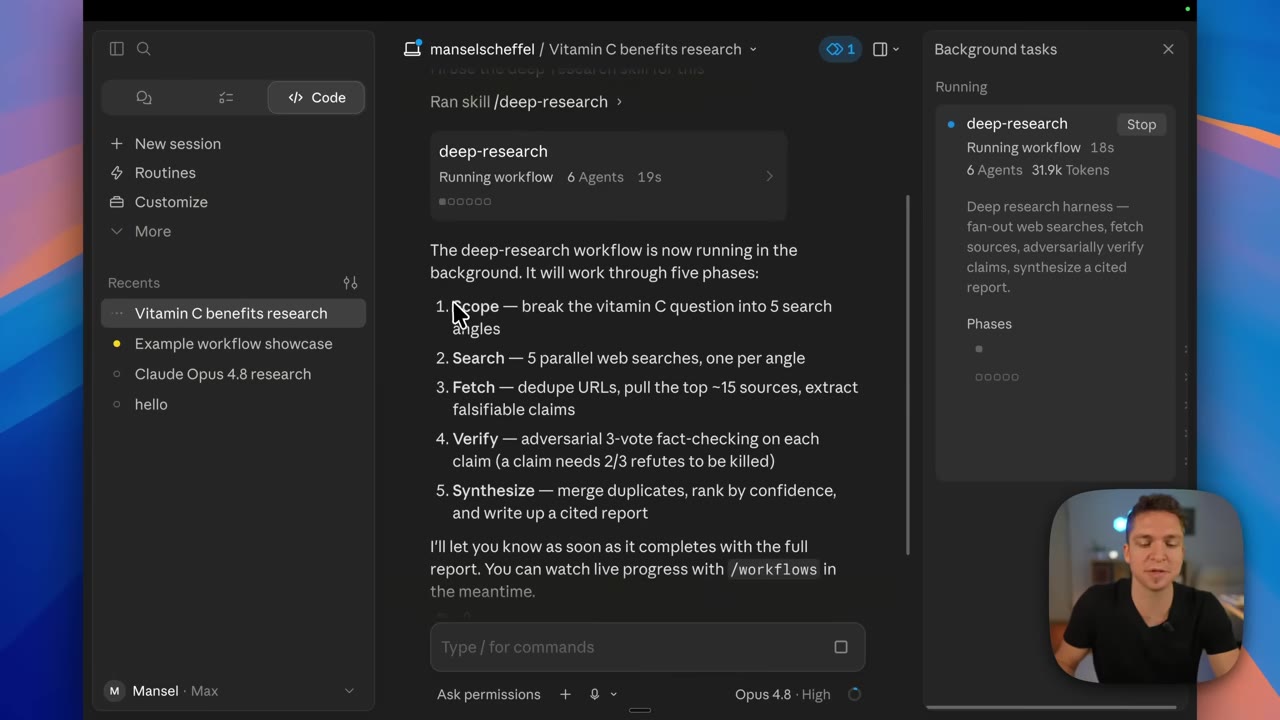
The new deep-research skill is a Workflow. Type "workflow" in chat and it shows up as a command; for this the speaker runs deep research on the benefits of vitamin C. It moves through five phases:
- ScopeBreak the question into 5 search angles.
- Search5 parallel web searches, one per angle.
- FetchDedupe URLs, pull the top ~15 sources, extract falsifiable claims.
- VerifyAdversarial 3-vote fact-checking on each claim — it needs 2 of 3 refutes before a claim is killed. This is where the agent count blows up.
- SynthesizeMerge duplicates, rank by confidence, write a cited report.
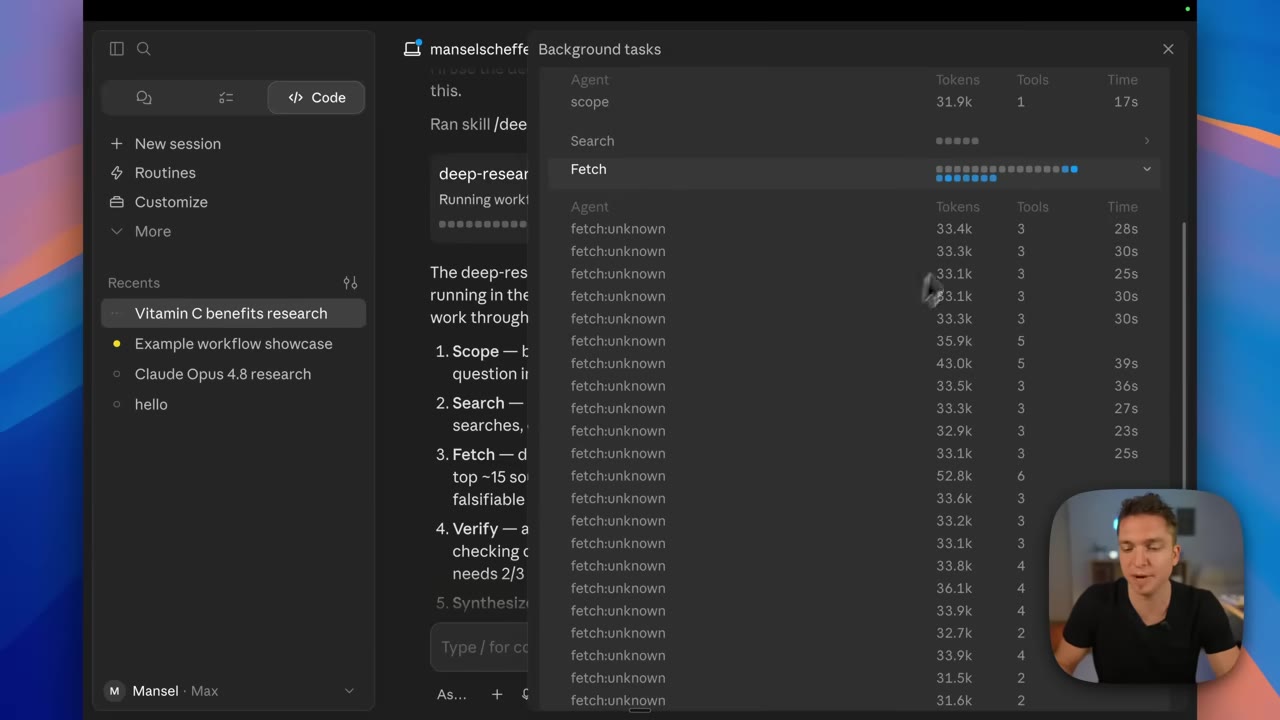
The numbers make the point. One minute in: 22 agents and over 550k tokens climbing. By the end: 105 agents, 3 million tokens, 15 minutes — for a vitamin C summary that wasn't even as detailed as you'd expect.
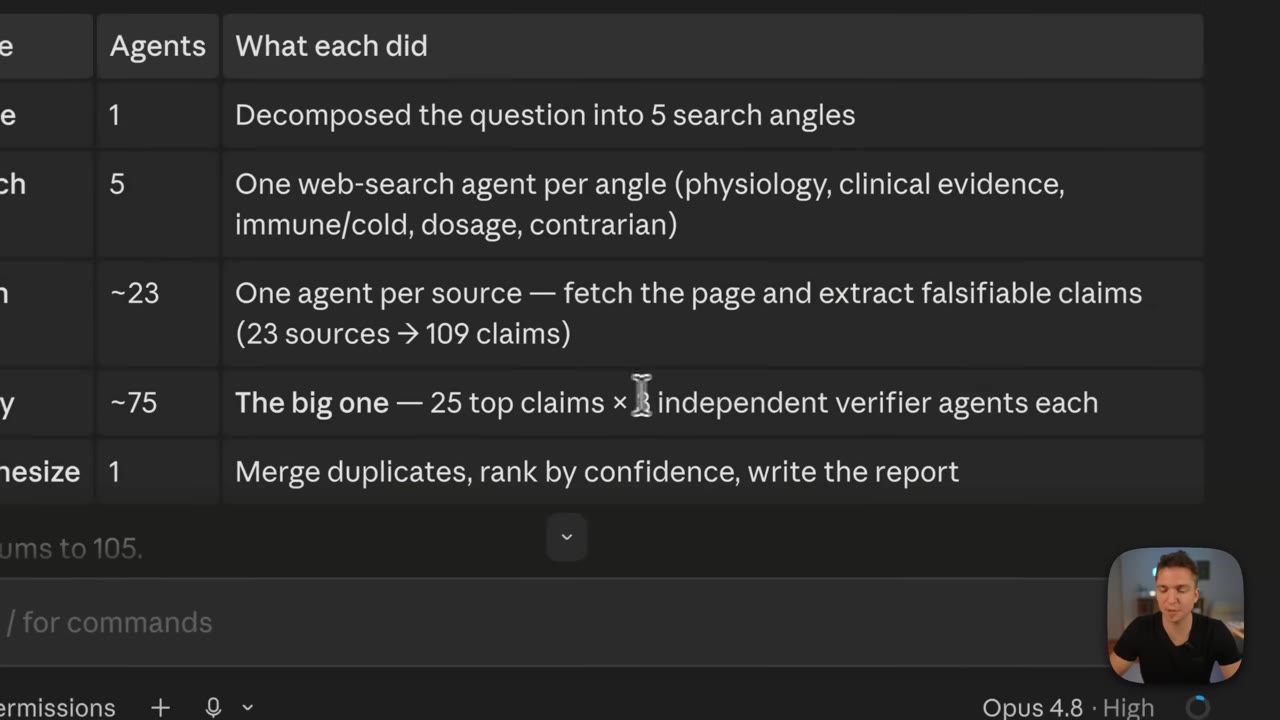
Just because we've isolated this to separate sub-agents doesn't mean we're magically going to get perfect usage. We are still using this much.— Mansel Scheffel
06 · Beyond code
Not just for developers
Asked to show off its own capabilities, Claude built a "startup forge" Workflow — a self-contained demo that maps onto the reusable orchestration patterns:
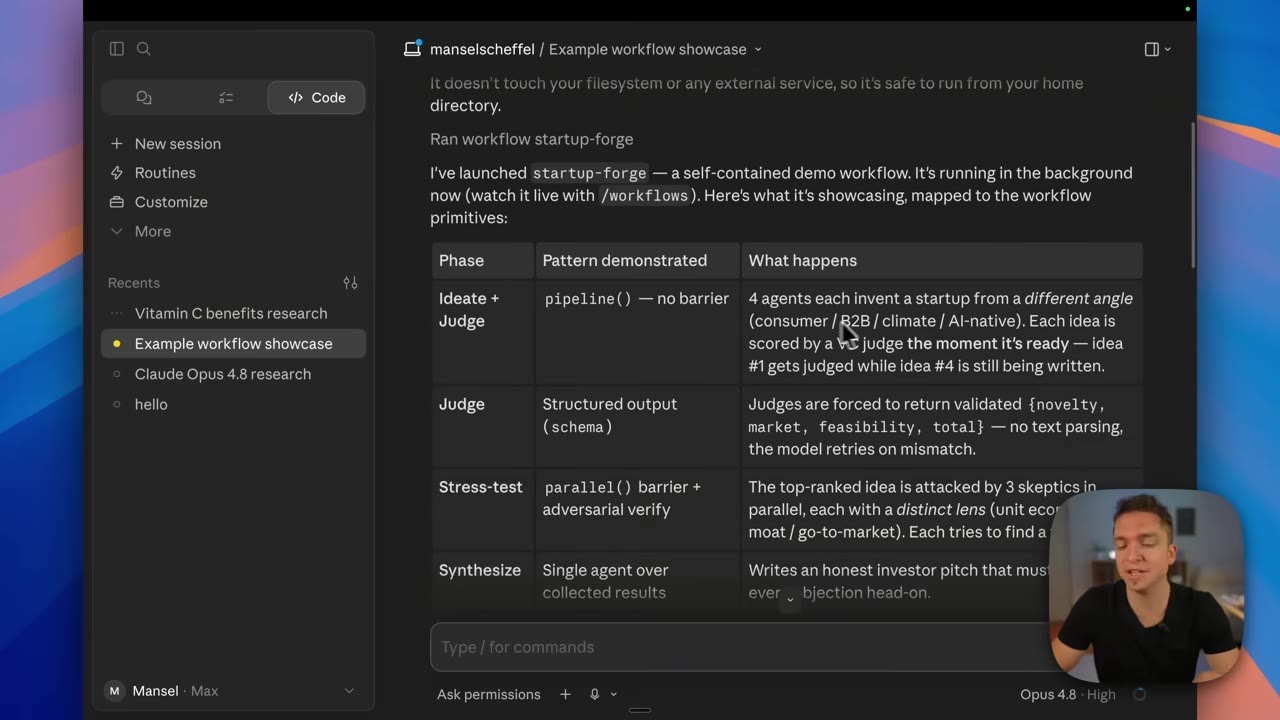
pipeline() with no barrier, schema-validated judges, a parallel() stress test, single-agent synthesis.06:48pipeline()
Four agents each invent a startup from a different angle — consumer, B2B, climate, AI-native — and each idea is judged the moment it's ready. Idea one gets scored while idea four is still being written.
structured output
The VC judge returns a validated schema (novelty, market, feasibility) plus a total, so there's nothing to parse.
parallel() + verify
The top idea is attacked by 3 skeptics in parallel, each with a distinct lens, hunting for a fatal flaw.
synthesize
One agent writes an honest investor pitch that has to confront every objection head on.
The script gets saved as a workflow.js you can rerun, and Claude offers to tweak it for you — bump the idea count, add a loop until there are no fatal objections, swap the domain. Other fits the speaker names: PR requests, codebase trawling, code reviews, audits, lead-gen fan-out (replacing brittle skill-chaining), and codebase-wide bug sweeps. But just because you can doesn't mean you should — the tokens add up fast.
07 · Model tiering
A different model per phase
You don't have to run everything on Opus or Sonnet. The model is set per agent() call, so you can match it to the task. A brand-brief demo does exactly that: six Haiku agents brainstorm name and tagline candidates, Sonnet scores each one, and Opus writes the final brief from the winner. You can tell Claude which models to use in your initial request, or open the script and change them yourself.
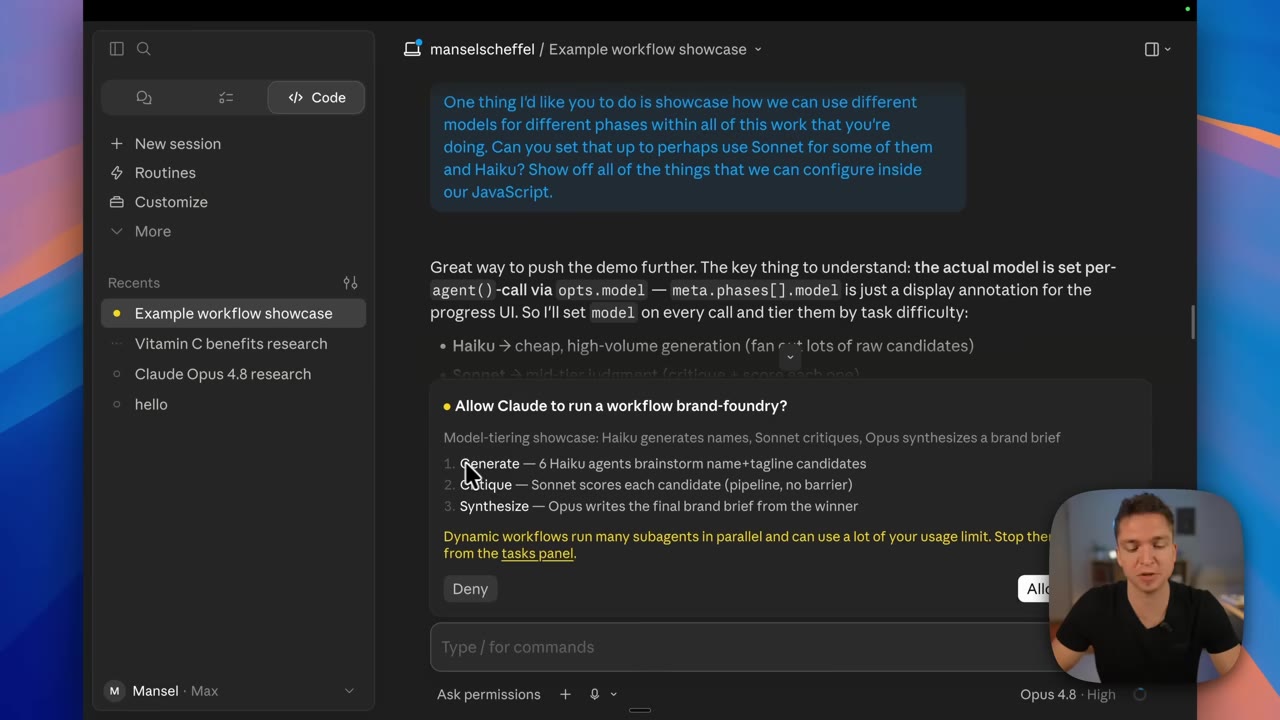
The more clarity that we provide the system up front, the better the output down the line. Come to it with a very specific request.— Mansel Scheffel
08 · Control
Three levels of control, and the off switches
You get the workflow well designed from the start with a clear, specific prompt — same as any other day with AI. After that there are three levels of control:
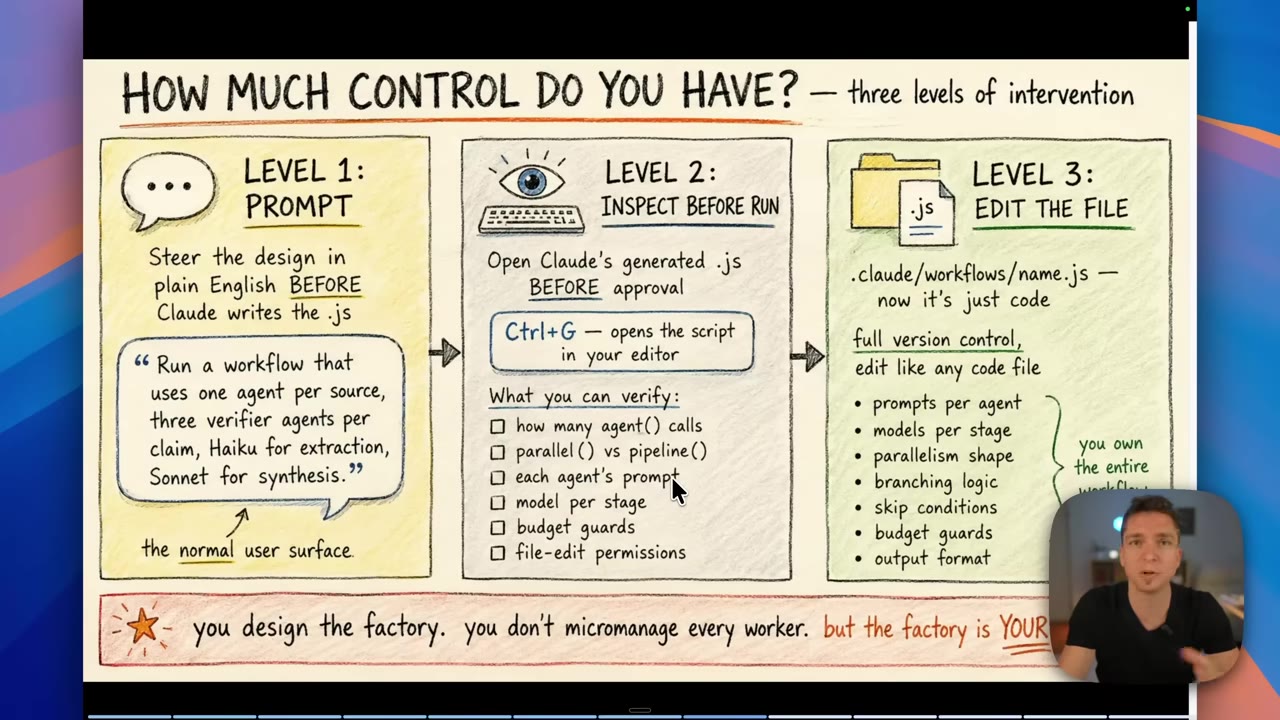
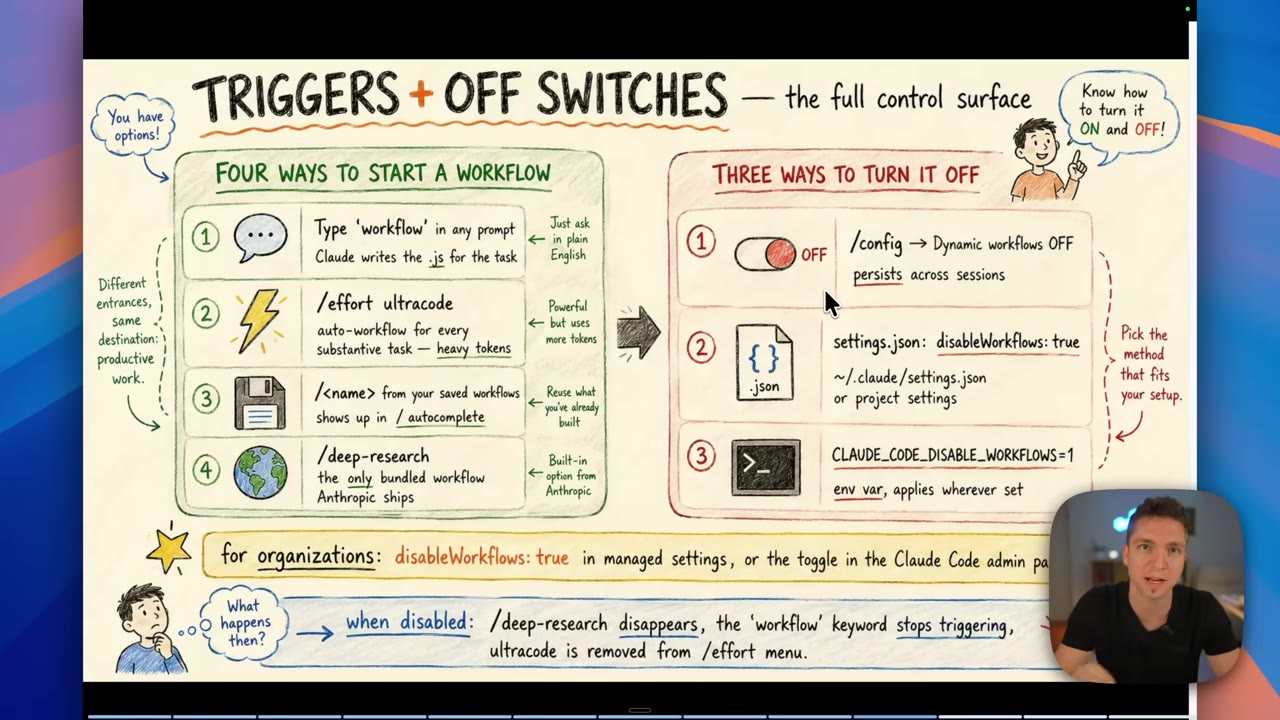
.js before it runs (Ctrl+G). Level 3: edit the file like any code.13:50By default a Workflow runs with edit-accept permissions, so it does what it needs to but won't bypass permissions unless you tell it to. Triggers include Effort Ultra code (which auto-runs a workflow on every substantive task — the speaker wouldn't go that far) and your saved workflows, which work in VS Code too. Turn it on or off with /config or by editing settings directly.
09 · When to use it
Reach for a Workflow when work fans out
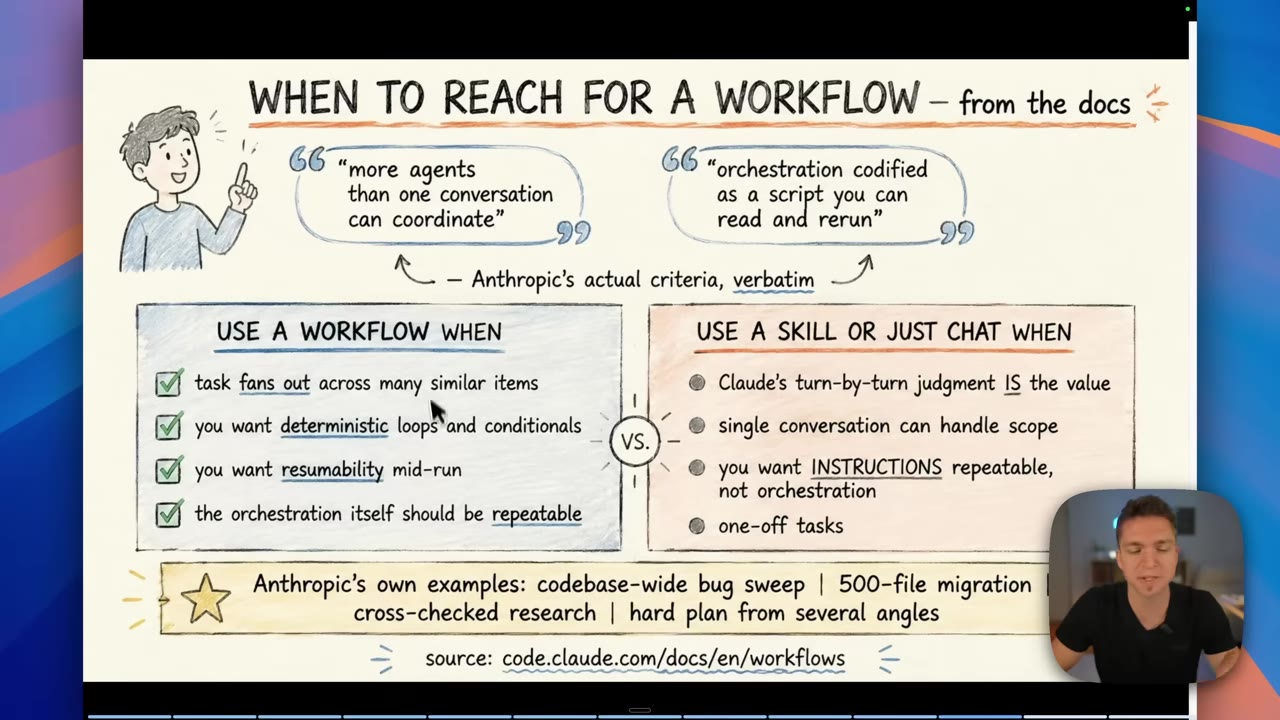
Use a Workflow when…
Work fans out across many similar items · you want deterministic loops · you need resumability mid-run · the orchestration itself should be repeatable.
Use a skill or just chat when…
Claude's turn-by-turn judgment is the value · a single conversation handles the scope · you want repeatable instructions, not orchestration · one-off tasks.
The speaker's bottom line: skills for the daily, repeatable business work where you want determinism and reliability; Workflows for the specific, fan-out-heavy jobs — big bug sweeps, software work at scale, cross-checked research. The biggest payoff is for developers building actual products. Just remember it's still in research preview, and the token bill is real.